Preserving build dependencies for reproducible builds

For a build to be reproducible, having the same source code is not enough. The build environment matters too. The Reproducible Builds project treats the compiler, build tools and their versions as part of that environment.
Containers are one way to package much of that environment, including the operating system, compiler, build tools and dependencies. But the container image also needs to stay available and unchanged. Docker tags are mutable. The tag can stay the same while the image behind it changes.
A recent example is traefik:v3.7.13. In September 2026, a user noticed that the image digest on Docker Hub had changed even though the tag had not. Traefik confirmed that Docker had rebuilt the official image after Alpine received security fixes. The Traefik binary itself was unchanged, but the OS layers around it were different.
That means pulling traefik:v3.7.13 before and after the rebuild could give you two different container images. For most users that is fine, and often desirable. But if one machine still has the earlier image while another pulls the rebuilt image, both builds can specify traefik:v3.7.13 and still run in different container environments. That can result in the all too familiar “but it works on my computer”.
Rather than wait for an upstream image to change, we can recreate the situation ourselves. We will use GNU Hello as a small example program and change the Docker image behind a tag we control. We will make the change obvious here by replacing GCC 12 with GCC 13. In practice, much smaller changes, such as an updated system package inside the image, can still break reproducibility.
TL;DR
We built GNU Hello with GCC 12 published under a Docker tag and cached the image through StableBuild. We then replaced the Docker Hub image under the same tag with GCC 13. Docker Hub returned GCC 13 while StableBuild continued to return the cached GCC 12 image. Building GNU Hello again with the StableBuild image reproduced the original binary byte-for-byte.
We’ll demonstrate this in four steps:
- Build the baseline with GCC 12
- Cache GCC 12 through StableBuild
- Replace testing-v1 with GCC 13
- Pull testing-v1 again and compare the builds
The Docker tag stays testing-v1 throughout. Only the image served under that tag changes on Docker Hub.
1. Build the baseline with GCC 12
We first published GCC 12.5.0 as tfryer/sb-hello-build-env:testing-v1.
We then compiled GNU Hello 2.12.1 from a fresh copy of the source with that image using ./configure and make -j1.
The resulting original/hello binary is our baseline.
2. Cache GCC 12 through StableBuild
Next, we pulled the same image through the StableBuild Docker mirror.
StableBuild cached the GCC 12 image that Docker Hub served under testing-v1.
3. Replace testing-v1 with GCC 13
We then published GCC 13.5.0 under the same Docker Hub tag.
Docker Hub now served GCC 13 under tfryer/sb-hello-build-env:testing-v1.
4. Pull testing-v1 again and compare the builds
We cleared the local Docker cache before pulling the images again. This prevents a locally stored image from affecting the result.
We then pulled testing-v1, both directly from Docker Hub and through StableBuild.
We checked the compiler version in each image.
Docker Hub returned GCC 13.5.0. StableBuild returned GCC 12.5.0.
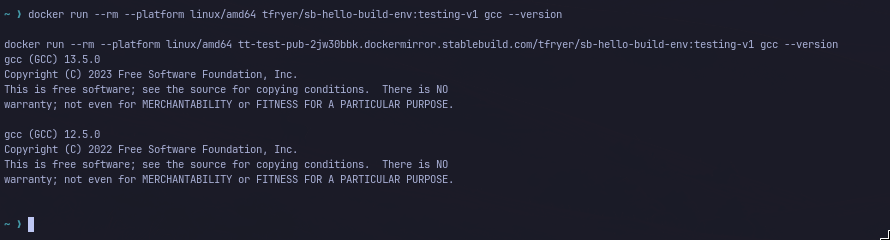
We then compiled fresh copies of GNU Hello 2.12.1 with each image. Both builds used the same source and the same ./configure and make -j1 commands as the baseline.
That gave us three binaries.
We compared their SHA-256 hashes.

original/hello and stablebuild/hello had the same SHA-256 hash. dockerhub/hello, built with GCC 13, had a different hash.
The build using the GCC 12 image cached by StableBuild reproduced the original GNU Hello binary byte-for-byte.
Where StableBuild fits
This demonstration controls one part of the build environment. It keeps the compiler image used by the original build available after the upstream Docker tag changes.
A SHA-256 comparison was enough for our demonstration because we already knew what had changed. The GCC 12 to GCC 13 change was obvious by design. If two builds differ and the reason is not clear, diffoscope can help inspect the artifacts and find where they differ. Other differences can come from nondeterministic data introduced during the build. strip-nondeterminism can normalize some of that data.
StableBuild deals with another part of the problem. It keeps external dependencies available after they change or disappear upstream.
In this demonstration, that dependency was the GCC 12 Docker image. StableBuild cached it before testing-v1 changed, which was enough to reproduce the original GNU Hello binary later. The traefik:v3.7.13 rebuild shows the same problem in the wild. The tag stayed the same while the image changed.
Keeping external dependencies available does not solve every reproducibility problem. It does make sure that an upstream change does not remove part of the build environment you need to reproduce.
The same idea applies beyond Docker. StableBuild also provides historical mirrors for Ubuntu, Debian and Alpine, a historical PyPI mirror, HuggingFace support and caching for other external files.
Create a free StableBuild account and start preserving the external dependencies your builds rely on.