Deadsnakes removed Ubuntu 20.04 support. What happens to existing builds?

After Ubuntu 20.04 left standard support in 2025, Deadsnakes removed its Focal packages.
You can see the result in places like Stack Exchange, where users are trying to rebuild setups that used to rely on those packages.
A Dockerfile using Deadsnakes might contain something like:
This worked while Deadsnakes still published Python 3.11 for Ubuntu 20.04.
Deadsnakes is community-maintained, Launchpad storage is limited and packages are deleted when an Ubuntu release reaches end of life. The live PPA now supports newer Ubuntu releases, but no longer contains the old Focal packages.
Trying the same install now can result in:
The build is still asking for the same package. It just isn't available from the live PPA anymore.
Pinning still depends on the package being there
Pinning an exact package version is an important part of making a build reproducible, but apt still needs somewhere to download it from.
If that version has been removed from the repository, knowing the exact version doesn't help much.
And APT is only one place this can happen. Builds often depend on Docker images, release files, package registries and ordinary download URLs as well.
Those sources keep changing even if the code using them doesn't.
Deadsnakes didn't do anything wrong
Deadsnakes never promised to be a permanent archive.
Keeping every Python package for every retired Ubuntu release forever would be a fairly ambitious thing to expect from someone's side project.
An older build can still need one of those packages long after the project that published it has moved on to newer releases.
You usually only notice when you need to build it again.
Why not just upgrade?
Often, upgrading Ubuntu is the right thing to do.
But there are plenty of cases where you still need the old environment first. You might be reproducing a bug in an older release, patching something a customer is still running or rebuilding an existing version before starting a larger migration.
Changing Ubuntu can also mean changing system libraries, Python and other dependencies at the same time. A small fix can quickly turn into a much bigger job.
Being able to rebuild the existing environment means you can deal with that separately.
Using the old Deadsnakes packages with StableBuild
StableBuild keeps daily historical snapshots of package repositories, including Deadsnakes.
For this case, you can point APT at a date from before the Focal packages were removed.
Here’s a snippet from a Dockerfile using the Deadsnakes repository as it existed on April 14, 2025:
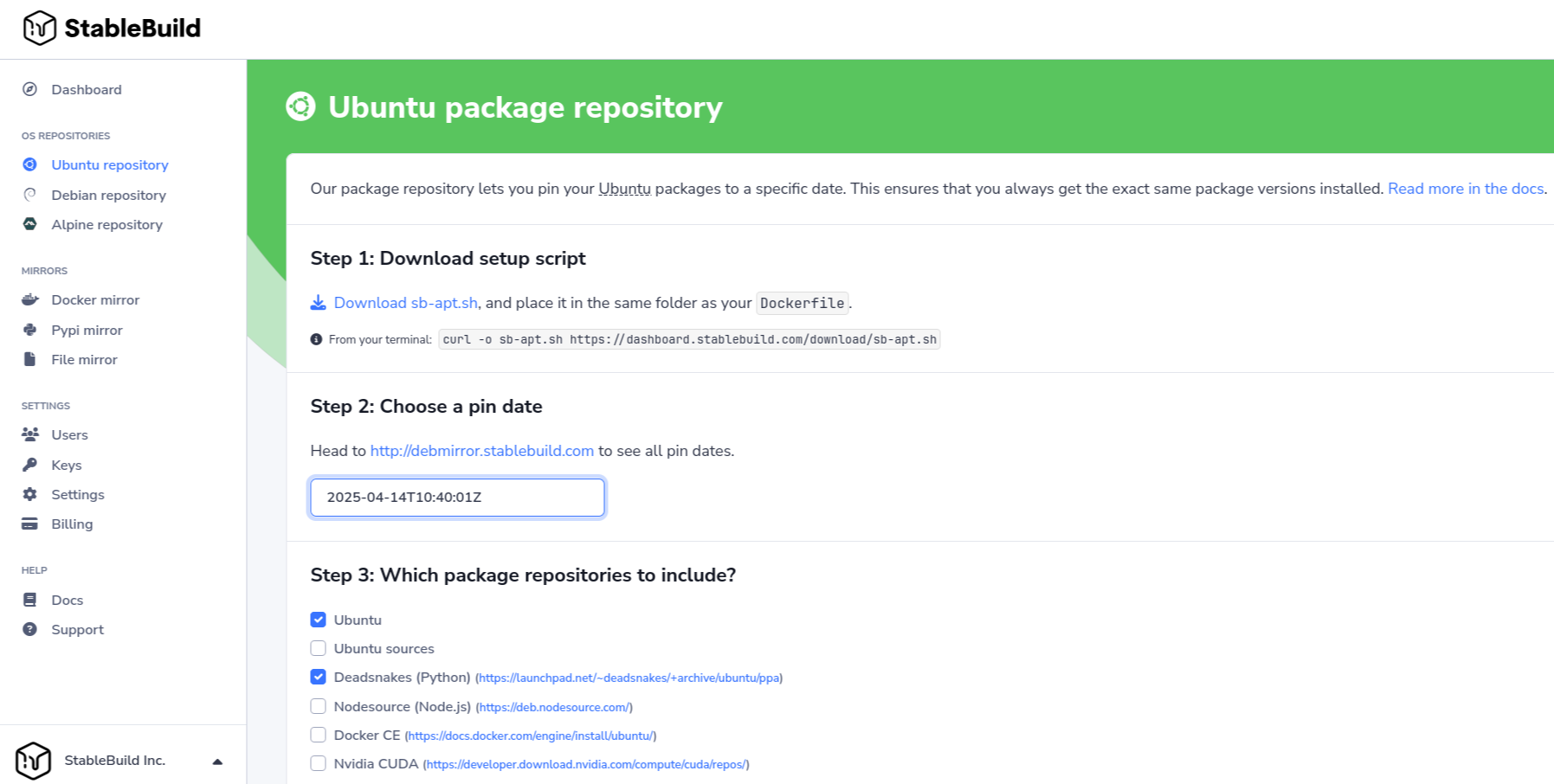
In the Ubuntu section of the StableBuild dashboard, select Ubuntu and Deadsnakes and download sb-apt.sh. The snapshot date is set with APT_PIN_DATE in the build.
sb-apt.sh then points APT at the Ubuntu and Deadsnakes snapshots for that date. After that, apt update and apt install work as usual.
StableBuild also handles other build dependencies, including container images, Python packages and files downloaded from URLs.
Deadsnakes dropping Focal is normal maintenance. The problem for an old build is simply that someone changed something somewhere else.
That will happen again, whether it's a package repository, an image registry or something else the build relies on. StableBuild keeps those dependencies available so an old build doesn't have to follow every change upstream.
A free StableBuild account is enough to try pinning one of your own builds.